Most small business owners have heard the term endpoint security. Fewer know exactly what it means — or whether their business actually has it.
This guide explains endpoint security in plain English, covers why it matters for businesses of any size, and walks through what good protection actually looks like in practice.
What Is Endpoint Security?
An endpoint is any device that connects to your business network or accesses your business data. That includes laptops, desktops, phones, and tablets — the tools your team uses every day to get work done.
Endpoint security is the practice of monitoring and protecting each of those devices so that a threat on one device cannot spread to everything else. It covers detection, protection, and response — not just prevention.
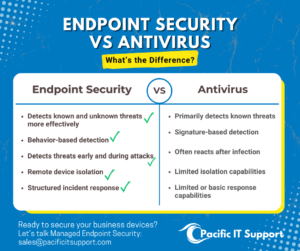
The key distinction from basic antivirus software is this: antivirus catches threats it already knows about. Endpoint security monitors behavior. It catches threats that look suspicious even if they have never been seen before — which is how most modern attacks work.
Every device your team uses to access business email, files, or systems is an endpoint. If any one of those devices is compromised and unmonitored, it is an open door into your business.
Why Small Businesses Are the Target
 There is a common assumption that cybercriminals are only interested in large companies. The data says the opposite. Small businesses are targeted more frequently, not less — precisely because they tend to have fewer protections in place.
Ransomware does not check your headcount before it encrypts your files. Phishing emails are not filtered by company size. And when a small business is hit, the impact is often more severe because there is less redundancy, fewer IT resources to respond, and less financial cushion to absorb the damage.
- 43% of cyberattacks target small businesses
- The average cost of a data breach for a small business exceeds $200,000
- 60% of small businesses that experience a significant cyberattack close within six months
These are not reasons to panic. They are reasons to have the right protection in place before something happens.
What Endpoint Security Actually Covers
 Good endpoint security does more than block known malware. Here is what a complete endpoint security solution covers:
Device monitoring and visibility
Before you can protect your devices, you need to know what devices exist, who is using them, and what they can access. Endpoint security starts with visibility — a complete picture of every device connected to your environment.
Behavioral detection
Rather than matching against a database of known threats, behavioral detection monitors what devices are actually doing. Unusual patterns — a device accessing files it never touches, an account logging in from an unexpected location, software behaving in ways it should not — trigger an alert regardless of whether the specific threat has been seen before.
24/7 monitoring and human response
Software can detect. Humans decide what to do. The most effective endpoint security combines automated detection with human analysts who review alerts, eliminate false positives, and take action when a real threat is confirmed. Pacific IT Support’s endpoint security includes a 24/7 human-led security operations center with a mean time to respond of 8 minutes.
Endpoint isolation
When a device is confirmed to be compromised, it can be immediately isolated from the rest of the network — cutting off the threat before it spreads. This happens remotely, without requiring anyone to physically access the device.
Automated remediation
Once a threat is confirmed and isolated, remediation removes it and restores normal function — often automatically, often within minutes, without the business experiencing significant downtime.
Endpoint Security vs Antivirus: What’s the Difference?
This is the question we hear most often. Most businesses have antivirus software. Many assume that means they are protected. It is an important distinction.
Who Needs Endpoint Security?
The short answer is any business whose team uses devices to access company data. That is every business.
The longer answer is that certain situations make endpoint security especially urgent:
- Remote or hybrid teams — devices moving between home, office, and public networks
- Businesses using Microsoft 365 or Google Workspace — cloud tools mean data is accessible from anywhere, including compromised devices
- Healthcare, legal, financial services, and nonprofits — handling sensitive data with compliance requirements
- Businesses approaching cyber insurance renewal — insurers now require documented endpoint protection
- Any business with employee turnover — devices and access that are not properly managed when people leave
How Pacific IT Support Handles Endpoint Security
At Pacific IT Support, endpoint security is not a standalone product bolted on as an afterthought. It is part of how we manage IT for our clients — integrated into the overall environment so every device is accounted for, protected, and monitored.
What that includes:
- Microsoft Defender managed at no extra cost — your existing Microsoft investment working harder
- EDR with behavioral detection — catches threats based on what they do, not just what they are
- Ransomware canaries — early-warning tripwires that detect ransomware activity before it spreads
- 24/7 human-led security operations center — real analysts, not just automated alerts
- 8-minute mean time to respond — industry average is hours
- Endpoint isolation and automated remediation — contain and resolve threats without downtime
- Works with Microsoft 365, Google Workspace, and Apple devices
- No minimum seat count — works for teams of any size
- Deploys in minutes with no DNS changes required
Any size business. Any industry. Anywhere in the country. Endpoint security should not be a large-company luxury. Pacific IT Support makes it accessible and practical for businesses of every size.
Frequently Asked Questions
Does my small business really need endpoint security?
Yes. Small businesses are targeted by cyberattacks more frequently than large ones because they tend to have fewer protections in place. Endpoint security is not a large-company problem — it is a business problem. Any team using devices to access company data needs protection.
Is endpoint security the same as antivirus?
No. Antivirus catches threats it already knows about. Endpoint security monitors device behavior and catches threats that have never been seen before. It also includes human review, remote isolation, and a documented response process — none of which basic antivirus provides.
 How long does it take to set up?
Pacific IT Support’s endpoint security deploys in minutes with no DNS changes required and no disruption to your team’s workflow. Setup is handled entirely by our team.
Do you require a minimum number of devices or users?
No. There is no minimum seat count. Endpoint security from Pacific IT Support works for businesses of any size.
What happens when a threat is detected?
Our 24/7 security operations center is alerted immediately. A human analyst reviews the alert within 8 minutes on average. If a real threat is confirmed, the affected device is isolated remotely and remediation begins — often without any noticeable impact on the rest of the team.
Does this work if my team uses Microsoft 365 or Google Workspace?
Yes. Our endpoint security works with Microsoft 365 and Google Workspace.
Ready to secure your business endpoints? Let’s connect!
Contact Pacific IT Support at pacificitsupport.com/contact
or call (877) 344-7450 and (360) 241 6711